

- Platformlar
- İşlem Platformu
- MetaTrader 4
- MetaTrader 4 Android
Android için MT4 - MetaTrader 4 Platformu
Download MetaTrader 4 for Android and trade the global financial markets straight from your smartphone or tablet. With this app, you can access real-time pricing, technical indicators, and a full range of order types—all from your Android device. Whether you're placing trades or just monitoring price movements, MT4 for Android gives you a flexible, reliable trading tool in your pocket.

About MetaTrader 4 Android
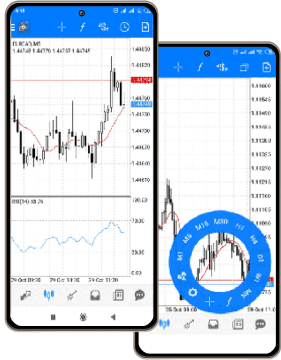
MetaTrader 4 Android is a mobile trading app that gives Android users full access to the core features of the MT4 desktop platform—optimized for mobile performance. It lets you trade Forex, CFDs on stocks, indices, and commodities on the go, with a clean interface that’s easy to use on smartphones and tablets.
The app includes all major trading functions—market and pending orders, stop-loss and take-profit levels, and instant order execution. One-tap trading from charts is available, and traders can access real-time quotes for all instruments.
MT4 Android also supports:
- interactive charts with zoom and scroll,
- 9 timeframes,
- and over 30 technical indicators.
You can customize your charts, monitor your trading history, and stay informed with built-in financial news feeds. The app is regularly updated to ensure compatibility across a wide range of Android versions and devices.
Secure login, multi-language support, and synced access to your IFC Markets account make the app a practical companion to your desktop trading platform.
Interesting fact: MetaTrader 4 for Android has consistently ranked among the top trading apps on Google Play, with millions of downloads and a loyal global user base—especially in regions where mobile-first trading is dominant.
With IFC Markets, MT4 Android gives you full flexibility to manage trades, follow the markets, and respond to price movements in real time—whenever and wherever you are.
MetaTrader 4 Android: Özellikler
- Ticari hesabın kapsamlı yönetimi
- Dünyanın her yerinden işlem yapabilme
- Her türlü emirler
- Geniş bir yelpazede akıllı telefonlar ve mobil tabletler
- Complete trading history
- Android için MT4'ü Google Play Store'dan indir
Android için MetaTrader 4
MetaTrader 4 Android, Android işletim sistemi ile çalışan cihazlar için tam kapsamlı bir işlem platformudur. MetaTrader 4 Android, trader'ler için popüler Android işletim sistemi destekleyen cihazlara MetaTrader 4 platformunu indirme firsatıdır.
Tüm ticari emirler, işlem geçmişi, etkileşimli grafikler ve en geniş yelpazede desteklenen mobil cihazlar - bütün bunlar Android için MetaTrader 4'te.
Neyle uğraşırsanız uğraşın, nerede olursanız olun Forex her zaman beraberinizdedir. MetaTrader 4 Android tarafindan sunulan entegre grafikler, finansal enstrümanın mevcut fiyat dinamiklerini belirlemede yardımcı olacak, ticaret geçmişinde daha önce yaptığınız tüm işlemleri bulacaksınız, ve güçlü bir ticaret sistemi yardımı ile - yeni başarılı işlemler yapacaksınız. Ve bütün bunları Android için MT4 ticaret uygulaması ile gerçekleştirmek mümkün!
Andorid için MetaTrader 4 Nasıl İndirilir


MT4 Android
Android için MT4 Sistem gereksinimleri
Android OS 2.1 ve üzeri işletim sistemiyle çalışan akıllı telefon ya da mobil tablet.
MT4 Android Hesabına Nasıl Erişilir
Ticari hesabınıza giriş yapmak için Metatrader 4 for Android terminalini Android işletim sistemiyle çalışan cihazınıza indirip çalıştırın ve "Var olan hesaba bağlanma"yı seçin.
- Demo hesap açmak veya Profilinizden açtığınız demo hesaplara erişmek için “IFCMarkets-Demo” sunucusunu seçin.
- Profilinizden açtığınız gerçek hesaplara erişmek için “IFCMarkets-Real” sunucusunu seçin.
MT4 için Android Nasıl Kaldırılır
- Yüklü uygulamalar listesine gidin
- MT4 Android ticaret uygulamasını bulun
- Uygulamayı tıklayın
- "Kaldır" düğmesini tıklayın.
Stop guessing, start winning
Try Market Analysis Lab
Get access now