

- Platformlar
- İşlem Platformu
- MetaTrader 4
- MetaTrader 4 iOS
MT4 iPhone ve MT4 iPad - MetaTrader 4 iOS
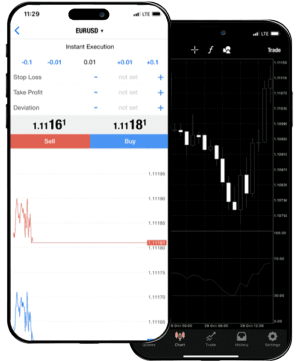
MetaTrader 4 for iOS lets you manage your trading account from your iPhone or iPad, giving you access to the markets anytime, anywhere. With real-time quotes, built-in indicators, and full trade management functions, the MT4 iOS app makes it easy to monitor your portfolio, analyze charts, and place trades on the go.

About MetaTrader 4 iOS
MetaTrader 4 for Mac iOS is a mobile trading platform designed for Apple iPhones and iPads, giving traders full access to global markets wherever they are. It’s a compact yet powerful version of the desktop MT4 terminal, allowing you to manage trades, analyze price movements, and stay connected to your account with just a few taps.
The app supports all major order types, including market, pending, and stop orders, along with one-tap execution and price alerts. Real-time quotes for all available instruments are always accessible, and you can open, modify, and close trades just like on the desktop version.
Charts come with multiple timeframes and are interactive, letting you zoom in, scroll, and apply technical indicators on the fly. With 30+ built-in indicators, financial news updates, and a secure login system, the app covers nearly everything a trader needs for day-to-day market decisions.
MetaTrader 4 for iOS is ideal for traders who travel frequently, those who monitor multiple markets, or anyone who wants to stay connected to trading opportunities without being tied to a computer.
Interesting fact: Despite being a mobile app, MT4 for iOS handles nearly the same volume of trades as its desktop counterpart during peak market hours—showing how widespread mobile trading has become.
With IFC Markets, the MT4 iOS app connects you to hundreds of instruments and gives you a professional trading experience from any Apple mobile device.
MetaTrader 4 iOS - Özellikler
MetaTrader 4 iOS, iOS ile çalışan mobil cihazlar için tam kapsamlı bir ticaret uygulamasıdır.
MetaTrader 4 iPhone (MetaTrader 4 iPad), geniş fırsatlarıyla herhangi bir trader'i etkileyebilir.
Tam özellikli bir e-ticaret paketidir, geniş yelpazeli teknik analiz araçları (30 teknik gösterge) ve tüm günlük aktivitelerinizde kullanım kolaylığı – bunların hepsi MetaTrader 4 iPhone (MT4 iPad)'da.
Böylece, MT4 iOS uygulaması, başarılı Forex Ticareti için ihtiyacınız olan her şeyi sunuyor.
Dünyanın herhangi bir yerinden, istediğiniz zaman ve ücretsiz olarak kolayca finansal piyasalara erişebilirsiniz. MetaTrader 4 iPhone'la bu firsatlar artık gerçek.
MetaTrader 4 iOS: Avantajlar
- Ticari hesabınızın kapsamlı yönetimi
- Dünyanın her yerinden işlem yapabilme
- 30 teknik gösterge
- Her türlü emirler
- Sesli sinyaller (Alerts)
- iPhone, iPad ve iPod Touch destekleniyor
- App Store'dan iOS için MT4'ü indirin
MetaTrader 4 iOS
MetaTrader 4 iOS Nasıl İndirilir


Desteklenen diller
- İngilizce
- Arapça
- Çekçe
- Fransızca
- Almanca
- Yunanca
- Hintçe
- Endonezya
- Italyanca
- Japonca
- Korece
- Malayca
- Lehçe
- Portekizce (BR)
- Rusça
- Çince (CN) - (TW)
- İspanyolca
- Türkçe
- Ukraynaca
- Vietnamca
Ticaret Sunucusuna Nasıl Bağlanılır
Ticari hesabınıza giriş yapmak için aşağıdakileri yapmanız gerekiyor:
- MetaTrader 4 iOS platformunu Internet bağlantısı olan iPhone'a (iPad'a) indirip çalıştırın
- "Ayarlar" sekmesine girip "Hesaplar" seçeneğini seçin
- Çıkan pencerenin sağ üst köşesinde"+" tuşuna basın
- Yeni pencerede "Varolan hesaba giriş yap" üzerine tıklayın
- Arama alanında demo hesaba giriş yapmak için ""IFCMarkets-Demo", gerçek hesaba giriş yapmak için ise "IFCMarkets-Real" yazın
- Login ve şifre girerek, pencerenin sağ üst köşesindeki "Giriş" tuşuna basın
MetaTrader 4 iOS - Sistem Gereksinimleri
- MT4 iOS, iPhone, iPod touch ve iPad cıhazlarında kullanılabilir.
-
MetaTrader 4 iOS, iOS 4.0 ve sonraki modeller ile
akıllı telefonlar veya tabletler gerektiriyor.
MT4 iOS Programı Nasıl Kaldırılır
- Simgeyi basılı tutarak MT4 iOS uygulamasını hareket moduna getirin
- Uygulama simgesinin köşesindeki X (çapraz) simgesine dokunun
- "Sil" düğmesine dokunun
Stop guessing, start winning
Try Market Analysis Lab
Get access now