

- Education
- About Forex
- Brokerage Account Comparison
Brokerage Account Comparison
Every trade you make passes through your brokerage account — and those conditions have a direct effect on your spreads, your leverage, and ultimately your bottom line. Yet most traders spend more time analysing their first trade than choosing the account that will define every trade after it.
Here you will find a clear side-by-side comparison of real account types and trading conditions for NetTradeX, MetaTrader 4, and MetaTrader 5, along with a step-by-step guide on how to open an account.
Key Moments
- Account type determines your costs: spread type (fixed vs. floating), execution method (instant vs. market), and minimum deposit all vary by account.
- Platforms matter: NetTradeX, MetaTrader 4, and MetaTrader 5 each offer different tools and instrument ranges — choose wisely.
- You can start with just 15 USD: Nano and Micro account options allow beginners to enter the market without a large capital commitment, while Standard accounts from 1,000 USD suit more experienced traders.
- Leverage up to 1:400: IFC Markets offers leverage up to 1:400 on Nano/Micro accounts and up to 1:200 on Standard accounts.
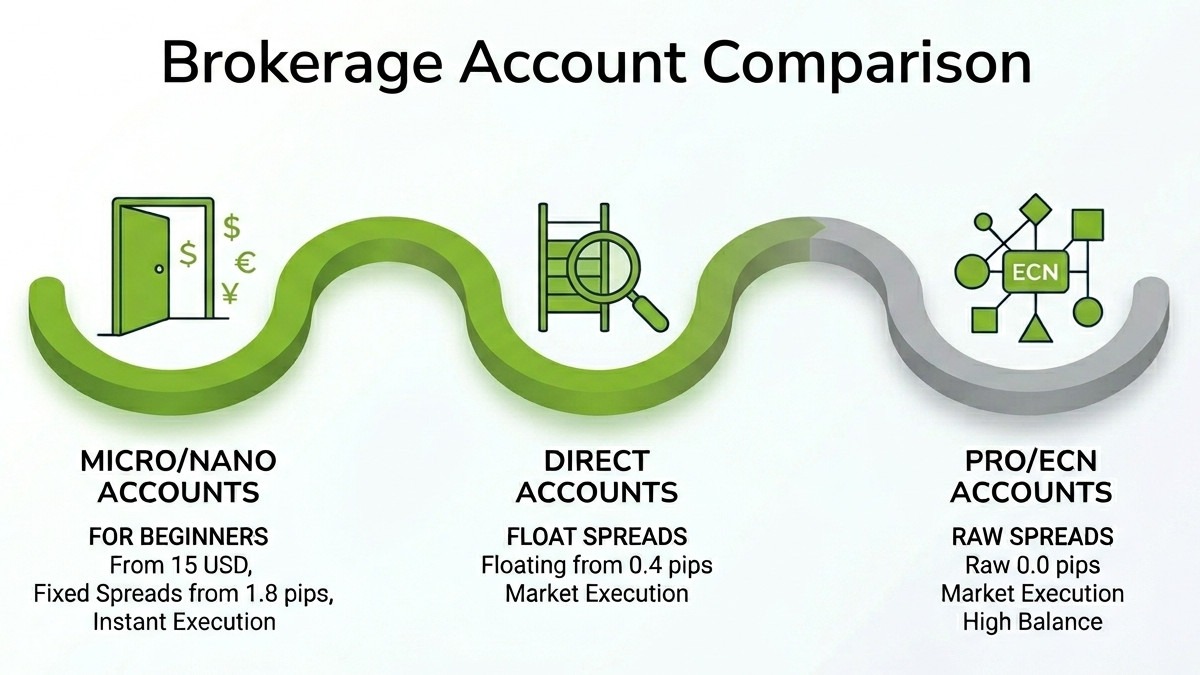
- Spreads directly impact profitability: depending on the account, spreads start from 1.8 pips (fixed, Classic), 0.4 pips (floating, Direct), 0.1 pips (Pro), or 0.0 pips (ECN). Choose the right spread type for your trading style.
- Practice before you commit: IFC Markets offers free demo accounts on all three platforms under real market conditions — always a good starting point before trading with real funds.
What is a Brokerage Account
Brokerage account is a financial account opened with a broker that allows individuals to buy, sell, and hold a wide range of investment assets — currencies, stocks, indices, commodities, precious metals, and cryptocurrencies.
Brokerage accounts give you direct access to financial markets, allowing you to place orders and profit from price movements. Funds deposited into a brokerage account are used as trading capital, and the broker acts as the intermediary between you and the market, executing your orders according to the trading conditions of your selected account type.
Brokerage Account Comparison
We are offering three leading trading platforms
Each has multiple account types for different trading styles and experience levels. Here below you can account conditions by platform.
Trading Account Types
| Classic Standard | Classic Nano | Direct Standard | Direct Nano | |
|---|---|---|---|---|
| Balance currency * | USD EUR JPY uBTC | USD EUR JPY uBTC | USD EUR JPY uBTC | USD EUR JPY uBTC |
| 1000 USD | 15 USD | 1000 USD | 15 USD | |
| ** | - | 5000 USD | - | 5000 USD |
| Maximum Leverage | 1:200 | 1:400 | 1:200 | 1:400 |
| Execution Type | Instant | Instant | Instant | Instant |
| Type of spread | Fixed | Fixed | Floating | Floating |
| Spread Value | From 1.8 pips | From 1.8 pips | From 0.4 pips | From 0.4 pips |
| Min Deal Volume | 10000 units (0.1 lot) | 100 units (0.001 lot) | 10000 units (0.1 lot) | 100 units (0.001 lot) |
| 10% | 10% | 10% | 10% | |
| Open Account | Open Account | Open Account | Open Account |
| Classic Standard | Classic Micro | |
|---|---|---|
| Balance currency | USD EUR JPY | USD EUR JPY |
| 1000 USD | 15 USD | |
| ** | - | 5000 USD |
| Maximum Leverage | 1:200 | 1:400 |
| Execution Type | Instant | Instant |
| Type of spread | Fixed | Fixed |
| Spread Value | From 1.8 pips | From 1.8 pips |
| Min Deal Volume | 0.1 lot | 0.01 lot |
| 10% | 10% | |
| Open Account | Open Account |
| Direct Standard | Direct Micro | Pro Standard | Pro Micro | ECN Standard | |
|---|---|---|---|---|---|
| Balance currency | USD EUR JPY | USD EUR JPY | USD EUR JPY | USD EUR JPY | USD EUR JPY |
| 1000 USD | 15 USD | 1000 USD | 15 USD | 1000 USD | |
| ** | - | 5000 USD | - | 5000 USD | - |
| Maximum Leverage | 1:200 | 1:400 | 1:200 | 1:400 | 1:200 |
| Execution Type | Instant | Instant | Market | Market | Market |
| Type of spread | Floating | Floating | Floating | Floating | Raw |
| Spread Value | From 0.4 pips | From 0.4 pips | From 0.1 pips | From 0.1 pips | From 0.0 pips |
| Min Deal Volume | 0.1 lot | 0.01 lot | 0.1 lot | 0.01 lot | 0.1 lot |
| 10% | 10% | 10% | 10% | 10% | |
| Transaction volume commission | - | - | - | - | 0.005% |
| Market Depth | - | - | - | - | Yes |
| Open Account | Open Account | Open Account | Open Account | Open Account |
How to Open a Brokerage Account
Opening a brokerage account with IFC Markets is a straightforward process that can be completed entirely online. Follow the steps below to get started.
1. Go to the IFC Markets website and click "Open Account"
On the IFC Markets website, press the Open Account button. This takes you to the registration page at the IFC Markets private area portal.
2. Click "Registration" and fill in your personal details
On the login page, click Registration. You will be taken to the registration form. Enter your given name(s) and surname in Latin transcription exactly as they appear in your official ID (passport, driver's licence, or national ID). Provide your email address — it will serve as your login and will receive company newsletters. Set a secure password, then re-enter it to confirm. Finally, enter your phone number including your country code and area code.
3. Confirm your email address
After submitting the registration form, check your email inbox for a message from IFC Markets containing a confirmation link. Click the link to verify your email address and complete the registration process.
4. Log in to your profile
Return to the IFC Markets website and press Login. Enter the email address and profile password you created during registration, then click Log in to access your personal area dashboard.
5. Navigate to "My Accounts" and open a live account
Inside your profile, press My Accounts then select My Live Accounts, or simply click the account widget on the dashboard. Click Open Live Account to begin setting up your trading account.
6. Choose your trading platform and account parameters
Select your preferred trading platform:
- NetTradeX
- MetaTrader 4
- MetaTrader 5
Then choose your account type:
- Classic
- Direct
- Pro
- ECN
Select your account size:
- Standard
- Nano / Micro
And your balance currency:
- USD
- EUR
- JPY
- uBTC
Tick the acknowledgement checkbox and click Open Account to confirm.
7. Fund your account and start trading
Once your account is created, make your initial deposit using one of IFC Markets' supported payment methods. Nano and Micro accounts require a minimum of just 15 USD, while Standard accounts start at 1,000 USD. After funding, download your chosen platform, log in using your trading account credentials, and you are ready to trade.
Conclusion
As you have seen, account type is not a minor detail — it shapes every trade you make. Spreads that eat into your margin, execution delays at the wrong moment, or a platform that cannot keep up with your strategy are all account problems. That is why the comparison matters.
IFC Markets gives you the choice — from a 15 USD Nano account to an ECN account with raw 0.0 pip spreads — built for different traders, yet both available on the same platform with the same 10% stop-out protection. Over 650 instruments, 3 platforms, fixed, floating, and raw spreads, instant and market execution.
- Open with a demo account if you need to find your footing.
- Move to a Micro or Nano account when you are ready to trade with real stakes but limited risk.
- Scale into a Standard or ECN account as your strategy matures.
Good luck!